In a previous post, I referenced a Linux Journal article looking at Arduino code development from a programmer’s viewpoint. Today’s ‘Arduino programming’ post will address what types of memory hardware are in the Arduino Uno and a little bit about how those different types of memory are used.
All the memory of a standard Arduino Uno R3 board is found in the Atmel ATmega328P microcontroller (MCU). If you look at the Arduino Uno Zenbike photo on the right that has the Arduino hardware components labeled, you can see where the microcontroller is located on the board. To begin understanding Arduino programming from a hardware standpoint, we need to know what chunks of memory hardware are inside that Atmel MCU.
The ATmega328P has three types of memory hardware:
ISP flash memory is where most of programming is stored. The Atmel MCU in the Arduino Uno has 32 KB of ISP flash. This is more room for program storage than some MCUs, especially other 8-bit MCUs, but there are many MCUs that have more memory. So if you’re working with a complex program on the Arduino Uno and run out of storage space, one option might be to use a different MCU that has more program memory capacity. For more info regarding the specifics of ISP flash on the Atmel AVR MCUs, see Atmels application note about that topic. Heres how Adafruit describes the ATmega328s flash:
Tronixstuff.com has a pretty good post about what the 1 KB of EEPROM in the Arduino Uno can be used for.
 If you find yourself needing more than 1 KB for storing data, there are EEPROM shields like the one shown at the left. However, as mentioned above, if memory capacity becomes an issue, you should first determine if a different MCU with more internal memory might be more appropriate for your use case.
Arduino beginners don’t need to be too concerned about where the different parts of their programs and data are being stored while they’re learning how to make an LED blink or doing the early Blum tutorials. As your Arduino programs get larger and more complex, however, you’ll probably want to put more effort into managing memory use on your Arduino. If this memory hardware guide for your Arduino doesn’t point you to a helpful resource for that memory management, you can put Google to work finding other resources for you.
Read More..
 |
| Arduino Uno hardware components (from Zenbike.com) |
All the memory of a standard Arduino Uno R3 board is found in the Atmel ATmega328P microcontroller (MCU). If you look at the Arduino Uno Zenbike photo on the right that has the Arduino hardware components labeled, you can see where the microcontroller is located on the board. To begin understanding Arduino programming from a hardware standpoint, we need to know what chunks of memory hardware are inside that Atmel MCU.
The ATmega328P has three types of memory hardware:
- 32 KB of In-System Programmable (ISP) Flash program memory
- 2 KB of SRAM (Static Random-Access Memory)
- 1 KB of EEPROM (Electrically Erasable Programmable Read-Only Memory)
 |
| Memory and CPU from ATmega328P block diagram |
“Flash memory is used to store your program image and any initialized data. You can execute program code from flash, but you cant modify data in flash memory from your executing code. To modify the data, it must first be copied into SRAM. Flash memory is the same technology used for thumb-drives and SD cards. It is non-volatile, so your program will still be there when the system is powered off. Flash memory has a finite lifetime of about 100,000 write cycles.”The ATmega328P’s 2 KB of SRAM is used in three main ways in the Arduino (info from above Adafruit link):
- “Static Data - This is a block of reserved space in SRAM for all the global and static variables from your program. For variables with initial values, the runtime system copies the initial value from Flash when the program starts.
- Heap - The heap is for dynamically allocated data items. The heap grows from the top of the static data area up as data items are allocated.
If you’ve gotten to the point where your MCU project’s program is controlling many items, receiving lots of inputs and just generally doing a lot of work, you might start taxing the SRAM. If that happens, or maybe to prevent that from happening, you might want to read Adafruit’s guide to optimizing use of SRAM, which says,
- Stack - The stack is for local variables and for maintaining a record of interrupts and function calls.”
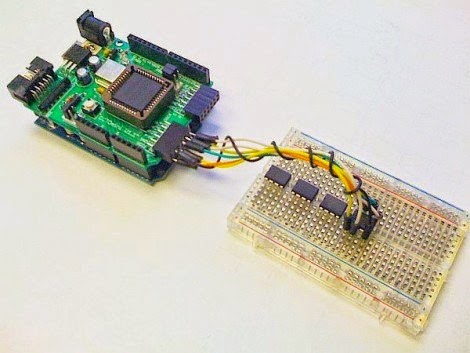
“SRAM is the most precious memory commodity on the Arduino...SRAM shortages are probably the most common memory problems on the Arduino...If your program is failing in an otherwise inexplicable fashion, the chances are good you have crashedIf you think you’ve crashed your Arduino because of program complexity, especially a program which might be expecting a lot in the areas of static data, heap and stack, try some of Adafruit’s suggestions for improving SRAM use. Also, because SRAM is the “most precious memory commodity on the Arduino,” you may want to consider a shield that provides more SRAM. Hackaday has a post showing a CPLD (Complex Programmable Logic Devices) shield that increases SRAM from the standard 1 KB by three orders of magnitude up to 2 MB.the stack due to a SRAM shortage. There are a number of things that you can do to reduce SRAM usage. These are just a few guidelines...”
Hackaday -- CPLD shield with 2 MB SRAM
Tronixstuff.com has a pretty good post about what the 1 KB of EEPROM in the Arduino Uno can be used for.
“EEPROM...is a form of non-volatile memory that can remember things with the power being turned off, or after resetting the Arduino...we can store data generated within a sketch on a more permanent basis...where data that is unique to a situation needs a more permanent home. For example, storing the unique serial number and manufacturing date of a commercial Arduino-based project – a function of the sketch could display the serial number on an LCD, or the data could be read by uploading a ‘service sketch’. Or you may need to count certain events and not allow the user to reset them – such as an odometer or operation cycle-counter.”
Arduino beginners don’t need to be too concerned about where the different parts of their programs and data are being stored while they’re learning how to make an LED blink or doing the early Blum tutorials. As your Arduino programs get larger and more complex, however, you’ll probably want to put more effort into managing memory use on your Arduino. If this memory hardware guide for your Arduino doesn’t point you to a helpful resource for that memory management, you can put Google to work finding other resources for you.
**********

 To get the most out of microcontrollers, though, one also needs to understand the software or firmware side of things. To get a better picture of how Arduino software functions, you may want to consider reading an article John H from the Humboldt Microcontrollers Group linked me to. The article is titled, "Understand Arduino development" and starts out this way,

